Home

/

Canvas

Canvas: Designing a multi-view QA tool to simplify creative review

Overview

Our production teams were using a single-deliverable review view - not ideal for reviewing creative campaigns as a set. To QA multiple assets, they used time-consuming workarounds.

I led the design of Canvas, a multi-view QA tool that improved review speed by 30%, reduced repeat errors, and quickly became the go-to solution for internal and client-facing teams. We shipped the MVP in under 6 weeks.

The problem

The existing QA tool only supported 1-up viewing, which meant campaigns had to be reviewed one deliverable at a time, even though consistency across deliverables was key. This caused repeated brand errors, manual workarounds like screenshots and third-party tools, slower QA and growing frustration for internal teams.
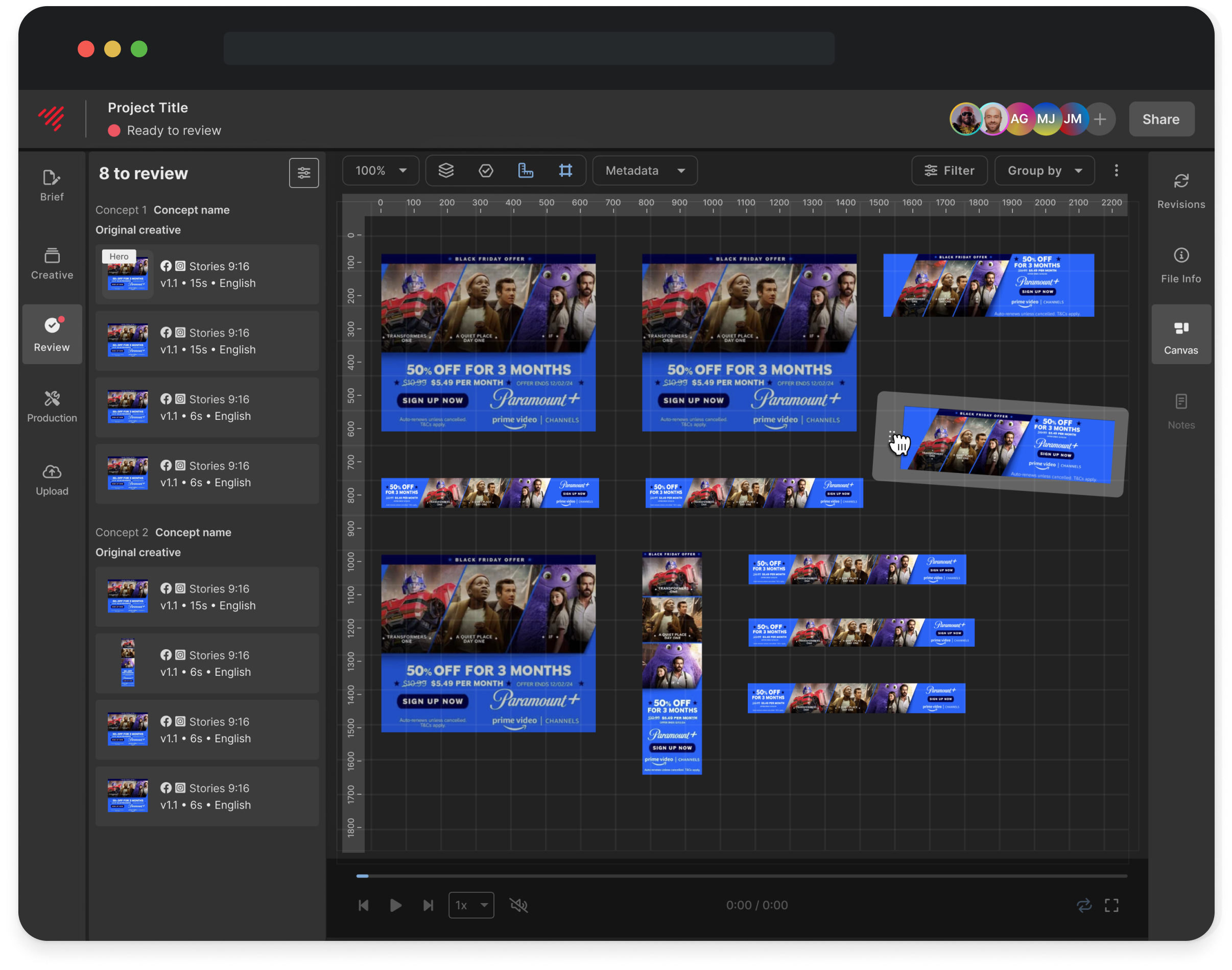
Canvas final MVP

Discovery & prioritisation

Stakeholders had a long wish-list, but our timeline was short.

I worked with the project engineer to evaluate features by technical effort vs. user value, and proposed a tightly scoped MVP. I collaborated closely with:

  • QA teams to understand pain points
  • Engineers to validate feasibility
  • PM to align on priorities and communication
  • QA analyst to write acceptance criteria

I also looked at other canvas tools and creative review tools for a light competitor analysis. While there was plenty of cross-over with canvas tools like Figma and Miro, and review tools like Frame.io, there wasn't really anything combining the two for a proper review experience within a canvas.

Some of our considerations were:

  • How to handle large-scale projects with 200+ assets
  • Page load performance and UI clarity when displaying many assets
  • Integration of the existing 1-up and version compare with this new tool
  • Defining the naming and product positioning of a brand new tool
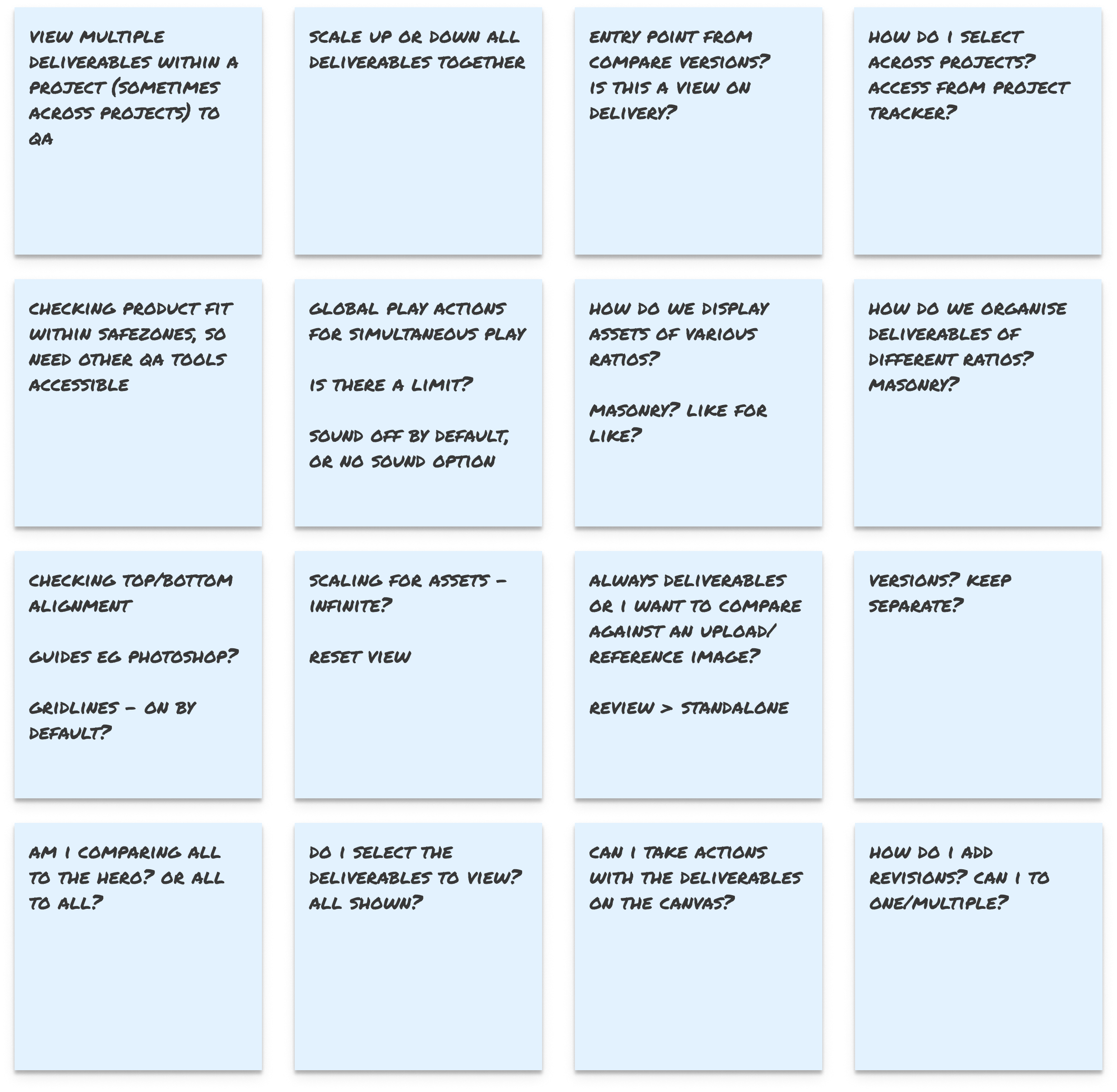
Gathering requirements and questions

Key design decisions

Internal feedback from the QA and production teams helped shape our MVP. We determined that the maximum amount for reviewing together was around 12 assets, and global player controls for video would be really useful. Other decisions included:

  • No new components: Used existing panel UI to reduce dev lift
  • Deliverable order: Matched Canvas layout to left-panel order for intuitive scanning
  • Ruler tool: Added after hearing users were installing Chrome extensions to measure assets
  • Draggable layout: Let QA teams visually group and compare assets with ease
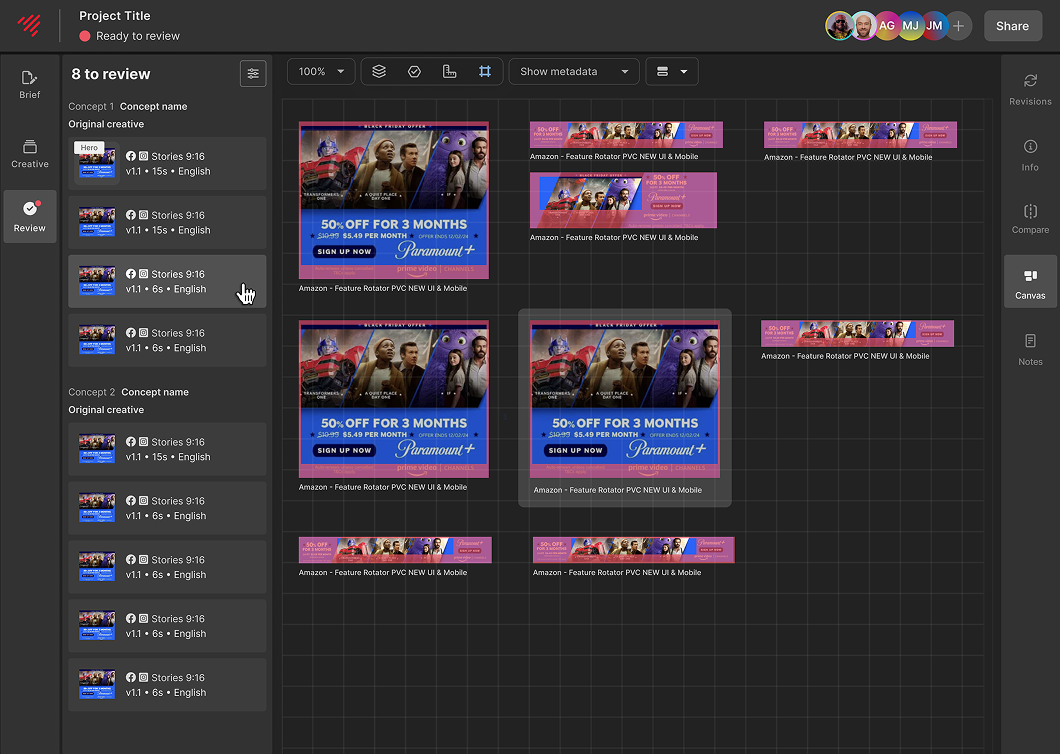
Hover to highlight asset on canvas
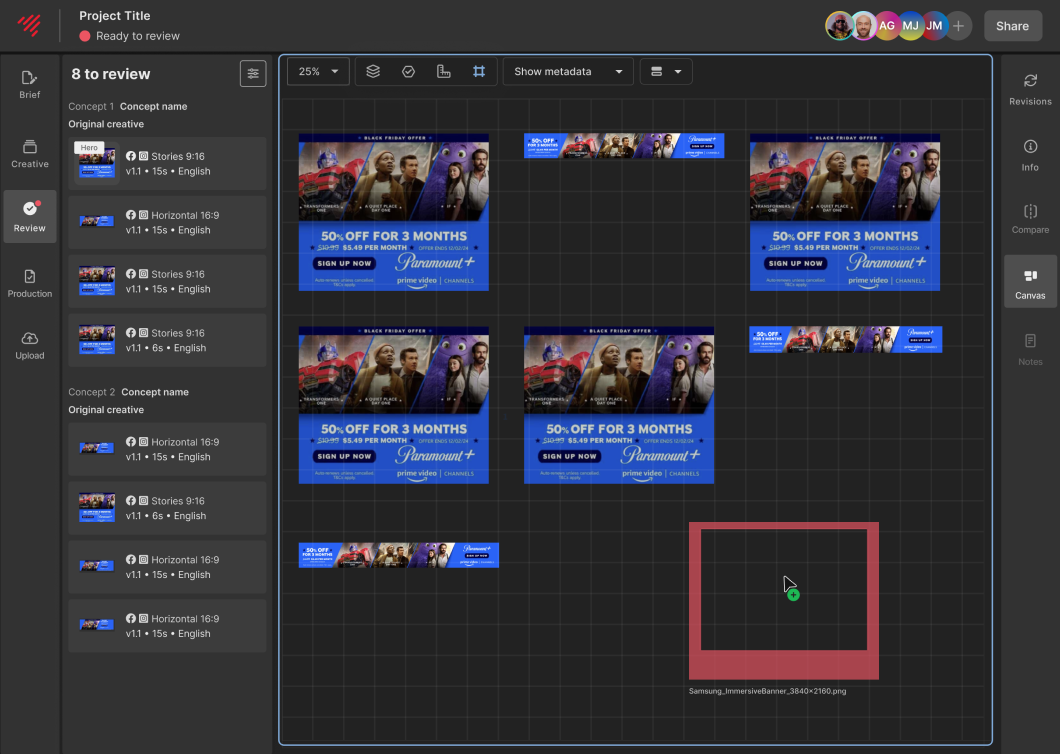
Dragging assets to canvas for overlays or safezones

Outcome

  • Shipped MVP in under 6 weeks
  • Reduced QA time by 30%
  • Replaced manual QA workarounds
  • Became a core tool for both internal QA and client-facing production workflows
  • Provided foundation for ongoing iteration and refinement

Final Canvas

Reflection

Canvas was a classic “tight scope, high impact” win, but more than that, it showed how aligning early on priorities, bringing stakeholders along with transparency, and designing within constraints can result in something simple, powerful, and widely adopted.

I’m currently working on the next iteration of this feature to incorporate 1-up view, version compare, and adding revisions within the same view.

Feedback from the team

Sam

Junior Producer

NGL this wee nugget kinda blew my mind - we are well and truly killing the game here team. Epic stuff. Move over Photoshop.

Mirr

Team Lead, Traffic

OMG the Canvas is now live!! So excited to use them on actual production projects!

Fenn

VP Creative Operations

Love it!

Mirr

Team Lead, Traffic

Hi @Sheeraz and @Kat, here to inform you guys that we finally got to put the canvas tool to full use with a project that contains a large number of deliverables. It is beyond helpful when its utilized to the full extent, must say!

Mirr

Team Lead, Traffic

OMGGGGG YESSSSSS! We would love it if that’s possible! Each of our team members had different opinions/preference of how it should be grouped. So this would be the perfect solution for it IMO. This might be a game changer!

Tuyet

Head of Traffic & QA

Hi @Kat @Sheeraz I tried this out on the dev environment and must say it’s an amazing tool!!

More projects
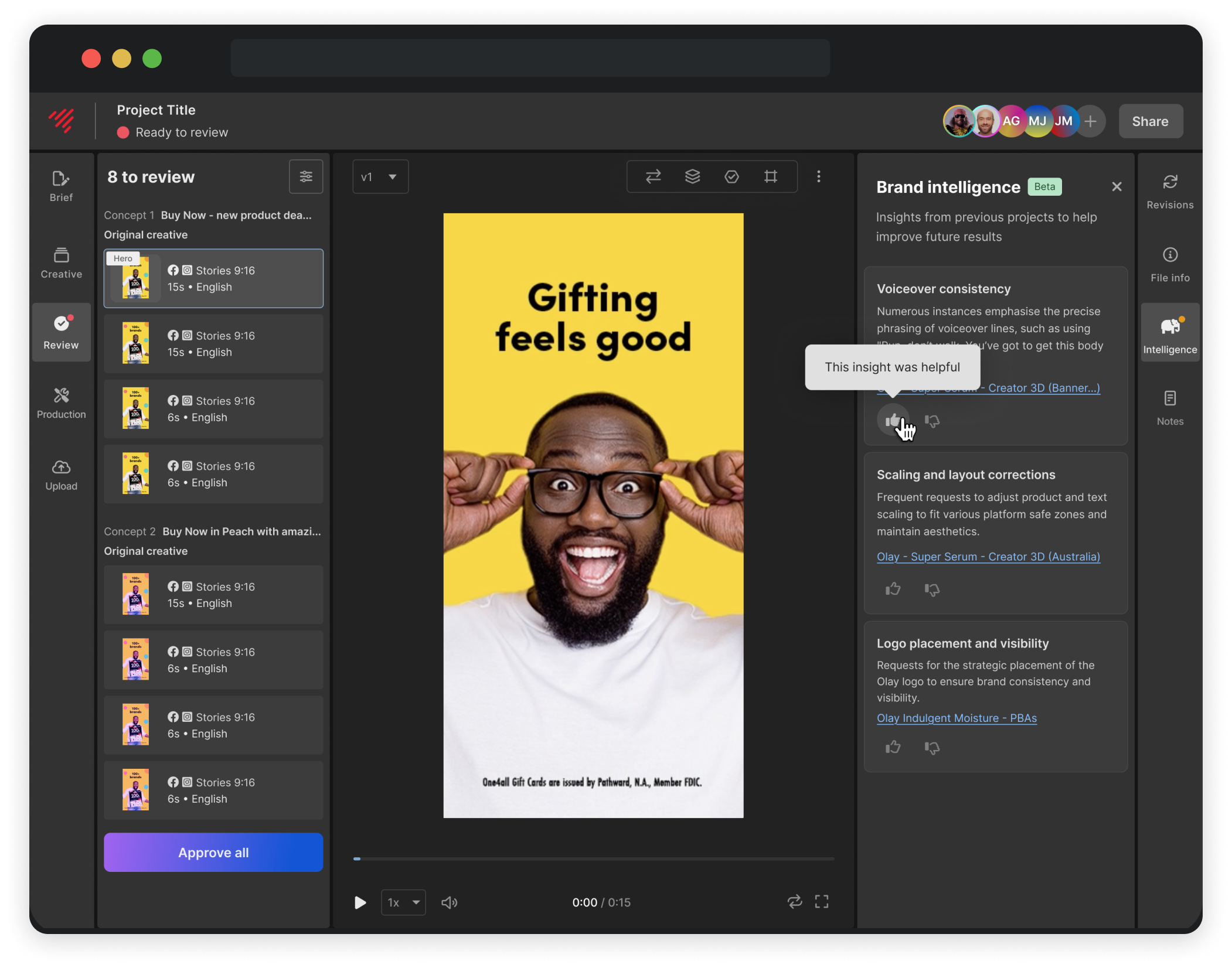
Brand intelligence: Surfacing hidden patterns to prevent repeat mistakes

A strategic design project that reframed the problem and proposed a smarter, AI-informed solution to reduce repeated brand mistakes in production.

View project →
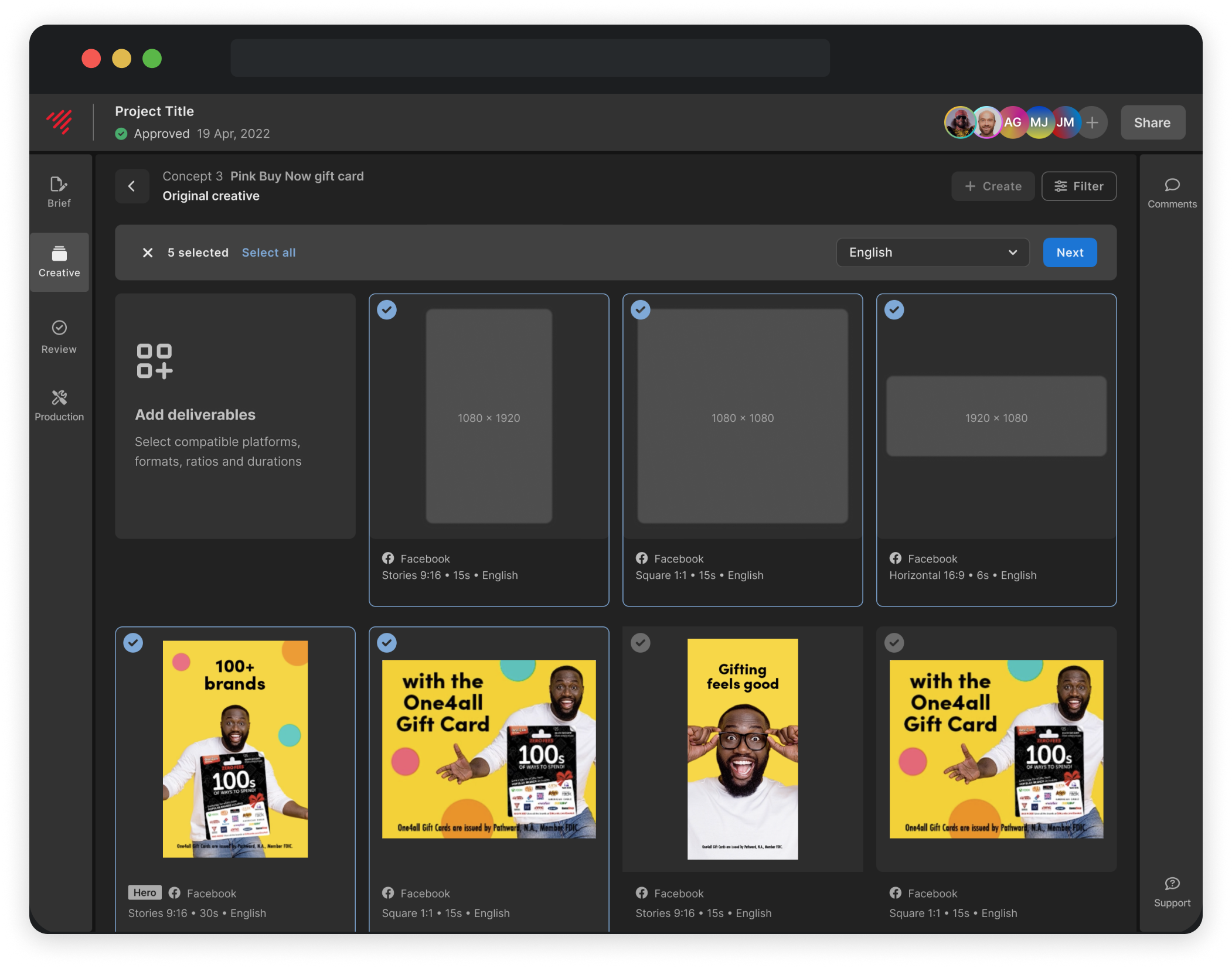
Variations: Designing a faster way to scale approved creative

A new flow that lets users scale from approved creative, without starting a new project. Now powering more than 40% of all creative through the platform.

View project →

Showroom to Screen: Redesigning an e-commerce experience to match a premium brand

A modern e-Commerce redesign that brought their brand to life online, and made it easier for customers to explore and engage with their products.

View project →

Kat McGowan

Home

/

Canvas

Canvas: Designing a multi-view QA tool to simplify creative review

Overview

Our production teams were using a single-deliverable review view - not ideal for reviewing creative campaigns as a set. To QA multiple assets, they used time-consuming workarounds.

I led the design of Canvas, a multi-view QA tool that improved review speed by 30%, reduced repeat errors, and quickly became the go-to solution for internal and client-facing teams. We shipped the MVP in under 6 weeks.

The problem

The existing QA tool only supported 1-up viewing, which meant campaigns had to be reviewed one deliverable at a time, even though consistency across deliverables was key. This caused repeated brand errors, manual workarounds like screenshots and third-party tools, slower QA and growing frustration for internal teams.

Canvas final MVP

Discovery & prioritisation

Stakeholders had a long wish-list, but our timeline was short.

I worked with the project engineer to evaluate features by technical effort vs. user value, and proposed a tightly scoped MVP. I collaborated closely with:

  • QA teams to understand pain points
  • Engineers to validate feasibility
  • PM to align on priorities and communication
  • QA analyst to write acceptance criteria

I also looked at other canvas tools and creative review tools for a light competitor analysis. While there was plenty of cross-over with canvas tools like Figma and Miro, and review tools like Frame.io, there wasn't really anything combining the two for a proper review experience within a canvas.

Some of our considerations were:

  • How to handle large-scale projects with 200+ assets
  • Page load performance and UI clarity when displaying many assets
  • Integration of the existing 1-up and version compare with this new tool
  • Defining the naming and product positioning of a brand new tool

Gathering requirements and questions

Key design decisions

Internal feedback from the QA and production teams helped shape our MVP. We determined that the maximum amount for reviewing together was around 12 assets, and global player controls for video would be really useful. Other decisions included:

  • No new components: Used existing panel UI to reduce dev lift
  • Deliverable order: Matched Canvas layout to left-panel order for intuitive scanning
  • Ruler tool: Added after hearing users were installing Chrome extensions to measure assets
  • Draggable layout: Let QA teams visually group and compare assets with ease

Hover to highlight asset on canvas

Dragging assets to canvas for overlays or safezones

Outcome

  • Shipped MVP in under 6 weeks
  • Reduced QA time by 30%
  • Replaced manual QA workarounds
  • Became a core tool for both internal QA and client-facing production workflows
  • Provided foundation for ongoing iteration and refinement

Final Canvas

Reflection

Canvas was a classic “tight scope, high impact” win, but more than that, it showed how aligning early on priorities, bringing stakeholders along with transparency, and designing within constraints can result in something simple, powerful, and widely adopted.

I’m currently working on the next iteration of this feature to incorporate 1-up view, version compare, and adding revisions within the same view.

Feedback from the team

Sam

Junior Producer

NGL this wee nugget kinda blew my mind - we are well and truly killing the game here team. Epic stuff. Move over Photoshop.

Mirr

Team Lead, Traffic

OMG the Canvas is now live!! So excited to use them on actual production projects!

Fenn

VP Creative Operations

Love it!

Mirr

Team Lead, Traffic

Hi @Sheeraz and @Kat, here to inform you guys that we finally got to put the canvas tool to full use with a project that contains a large number of deliverables. It is beyond helpful when its utilized to the full extent, must say!

Tuyet

Head of Traffic & QA

Hi @Kat @Sheeraz I tried this out on the dev environment and must say it’s an amazing tool!!

More projects

Brand intelligence: Surfacing hidden patterns to prevent repeat mistakes

A strategic design project that reframed the problem and proposed a smarter, AI-informed solution to reduce repeated brand mistakes in production.

View project →

Variations: Designing a faster way to scale approved creative

A new flow that lets users scale from approved creative, without starting a new project. Now powering more than 40% of all creative through the platform.

View project →

Showroom to Screen: Redesigning an e-commerce experience to match a premium brand

A modern e-Commerce redesign that brought their brand to life online, and made it easier for customers to explore and engage with their products.

View project →

Kat McGowan

Home

/

Canvas

Canvas: Designing a multi-view QA tool to simplify creative review

Overview

Our production teams were using a single-deliverable review view - not ideal for reviewing creative campaigns as a set. To QA multiple assets, they used time-consuming workarounds.

I led the design of Canvas, a multi-view QA tool that improved review speed by 30%, reduced repeat errors, and quickly became the go-to solution for internal and client-facing teams. We shipped the MVP in under 6 weeks.

The problem

The existing QA tool only supported 1-up viewing, which meant campaigns had to be reviewed one deliverable at a time, even though consistency across deliverables was key. This caused repeated brand errors, manual workarounds like screenshots and third-party tools, slower QA and growing frustration for internal teams.

Canvas final MVP

Discovery & prioritisation

Stakeholders had a long wish-list, but our timeline was short.

I worked with the project engineer to evaluate features by technical effort vs. user value, and proposed a tightly scoped MVP. I collaborated closely with:

  • QA teams to understand pain points
  • Engineers to validate feasibility
  • PM to align on priorities and communication
  • QA analyst to write acceptance criteria

I also looked at other canvas tools and creative review tools for a light competitor analysis. While there was plenty of cross-over with canvas tools like Figma and Miro, and review tools like Frame.io, there wasn't really anything combining the two for a proper review experience within a canvas.

Some of our considerations were:

  • How to handle large-scale projects with 200+ assets
  • Page load performance and UI clarity when displaying many assets
  • Integration of the existing 1-up and version compare with this new tool
  • Defining the naming and product positioning of a brand new tool

Gathering requirements and questions

Key design decisions

Internal feedback from the QA and production teams helped shape our MVP. We determined that the maximum amount for reviewing together was around 12 assets, and global player controls for video would be really useful. Other decisions included:

  • No new components: Used existing panel UI to reduce dev lift
  • Deliverable order: Matched Canvas layout to left-panel order for intuitive scanning
  • Ruler tool: Added after hearing users were installing Chrome extensions to measure assets
  • Draggable layout: Let QA teams visually group and compare assets with ease

Hover to highlight asset on canvas

Dragging assets to canvas for overlays or safezones

Outcome

  • Shipped MVP in under 6 weeks
  • Reduced QA time by 30%
  • Replaced manual QA workarounds
  • Became a core tool for both internal QA and client-facing production workflows
  • Provided foundation for ongoing iteration and refinement

Final Canvas

Reflection

Canvas was a classic “tight scope, high impact” win, but more than that, it showed how aligning early on priorities, bringing stakeholders along with transparency, and designing within constraints can result in something simple, powerful, and widely adopted.

I’m currently working on the next iteration of this feature to incorporate 1-up view, version compare, and adding revisions within the same view.

Feedback from the team

Sam

Junior Producer

NGL this wee nugget kinda blew my mind - we are well and truly killing the game here team. Epic stuff. Move over Photoshop.

Mirr

Team Lead, Traffic

OMG the Canvas is now live!! So excited to use them on actual production projects!

Fenn

VP Creative Operations

Love it!

Mirr

Team Lead, Traffic

Hi @Sheeraz and @Kat, here to inform you guys that we finally got to put the canvas tool to full use with a project that contains a large number of deliverables. It is beyond helpful when its utilized to the full extent, must say!

Mirr

Team Lead, Traffic

OMGGGGG YESSSSSS! We would love it if that’s possible! Each of our team members had different opinions/preference of how it should be grouped. So this would be the perfect solution for it IMO. This might be a game changer!

Tuyet

Head of Traffic & QA

Hi @Kat @Sheeraz I tried this out on the dev environment and must say it’s an amazing tool!!

More projects

Brand intelligence: Surfacing hidden patterns to prevent repeat mistakes

A strategic design project that reframed the problem and proposed a smarter, AI-informed solution to reduce repeated brand mistakes in production.

View project →

Variations: Designing a faster way to scale approved creative

A new flow that lets users scale from approved creative, without starting a new project. Now powering more than 40% of all creative through the platform.

View project →

Showroom to Screen: Redesigning an e-commerce experience to match a premium brand

A modern e-Commerce redesign that brought their brand to life online, and made it easier for customers to explore and engage with their products.

View project →