Home

/

ShuttlerockCloud customer basics

ShuttlerockCloud customer basics

Overview

A 5-minute microlearning module that gives new ShuttlerockCloud customers a clear, fast introduction to the platform’s essentials - AI controls, briefs, variations, brand profiles, and the creative workflow.

Built using adult learning principles to reduce cognitive load and help customers build a quick, accurate mental model of how to get started.

View the module

The challenge

New customers want to get started quickly and don’t have time for long-form training.

The original onboarding relied on isolated quiz questions and dense text, which made it difficult for learners to:

  • understand how the platform worked end-to-end
  • connect concepts such as AI controls, briefs, and variations
  • know which parts were optional vs required
  • build confidence before submitting their first project

This caused early friction and slowed time-to-value.

Learners needed:

  • a simple, high-level overview of the workflow
  • clarity on AI usage and privacy
  • visual guidance on scaling creative
  • a quick sense of “what to do first”

My approach

I approached this module using adult learning principles - sequencing content, reducing cognitive load, and presenting only the essential actions new customers need for their first project.

1. Defined the key messages

Prioritised the concepts customers need immediately:

AI controls, submitting briefs, understanding the workflow, scaling creative, and navigating review + approval.

This aligns with adult learning theory (Knowles): learners value content that is relevant, actionable, and tied to real tasks they need to perform right now.

2. Understood the learner

Customer onboarding is a moment where clarity and speed matter most.

I kept the experience lightweight and visual, focusing only on essential information that supports a quick, accurate mental model.

This is rooted in cognitive load theory - removing extraneous detail and keeping visuals simple supports comprehension and recall.

3. Designed a simple learning flow

The module follows a task-first sequence:

Welcome → AI → Workflow → Variations → Brand Profiles → Review → Quick Quiz → Next Steps

Each section delivers one concept at a time, supporting scaffolding (building knowledge progressively).

4. Built for clarity

I storyboarded the flow in Figma, then rebuilt it in Rise using:

  • custom full-width visuals
  • short instructional copy
  • simple workflow diagrams
  • callouts to highlight key decisions
  • scenario questions for reinforcement

Visuals and copy were designed to reduce cognitive load and let the content lead.

5. Tested & refined

Reviewed pacing and comprehension with peers, adjusted microcopy, simplified diagrams, and refined scenario questions to strengthen decision-making practice.

This aligns with iterative design principles and helps ensure real-world applicability.
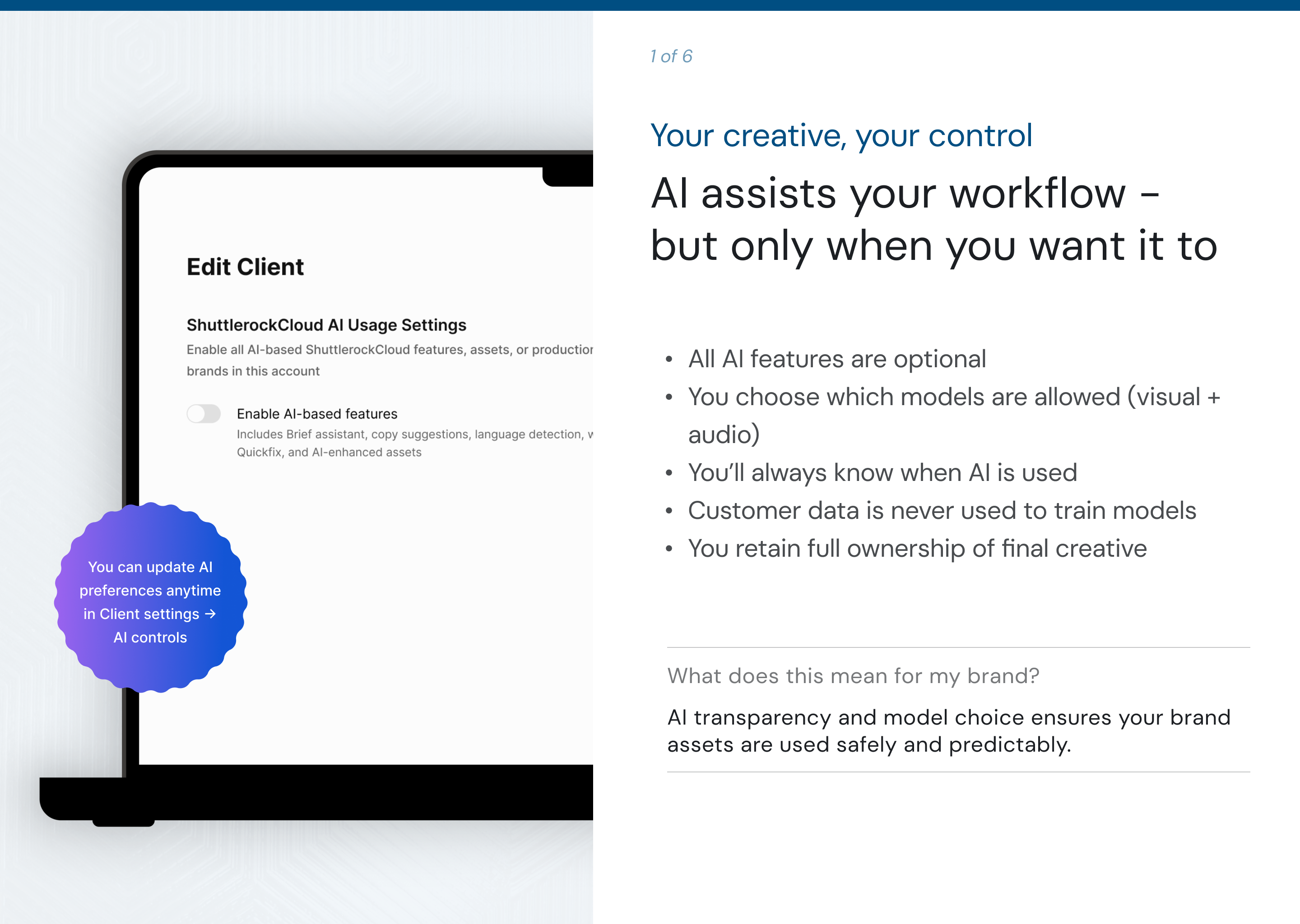
Explains AI transparency and user control using clean visuals and short, high-value text - applying adult learning principles to keep information relevant and actionable.

The solution

The final module delivers a fast, guided introduction to ShuttlerockCloud:

  • explaining AI transparency and choice
  • clarifying how briefs flow into production
  • illustrating the end-to-end workflow
  • showing how to scale creative with variations
  • reinforcing brand consistency
  • demonstrating review and annotation tools

The tone is friendly and practical, giving learners just enough to feel confident - without overwhelming them.
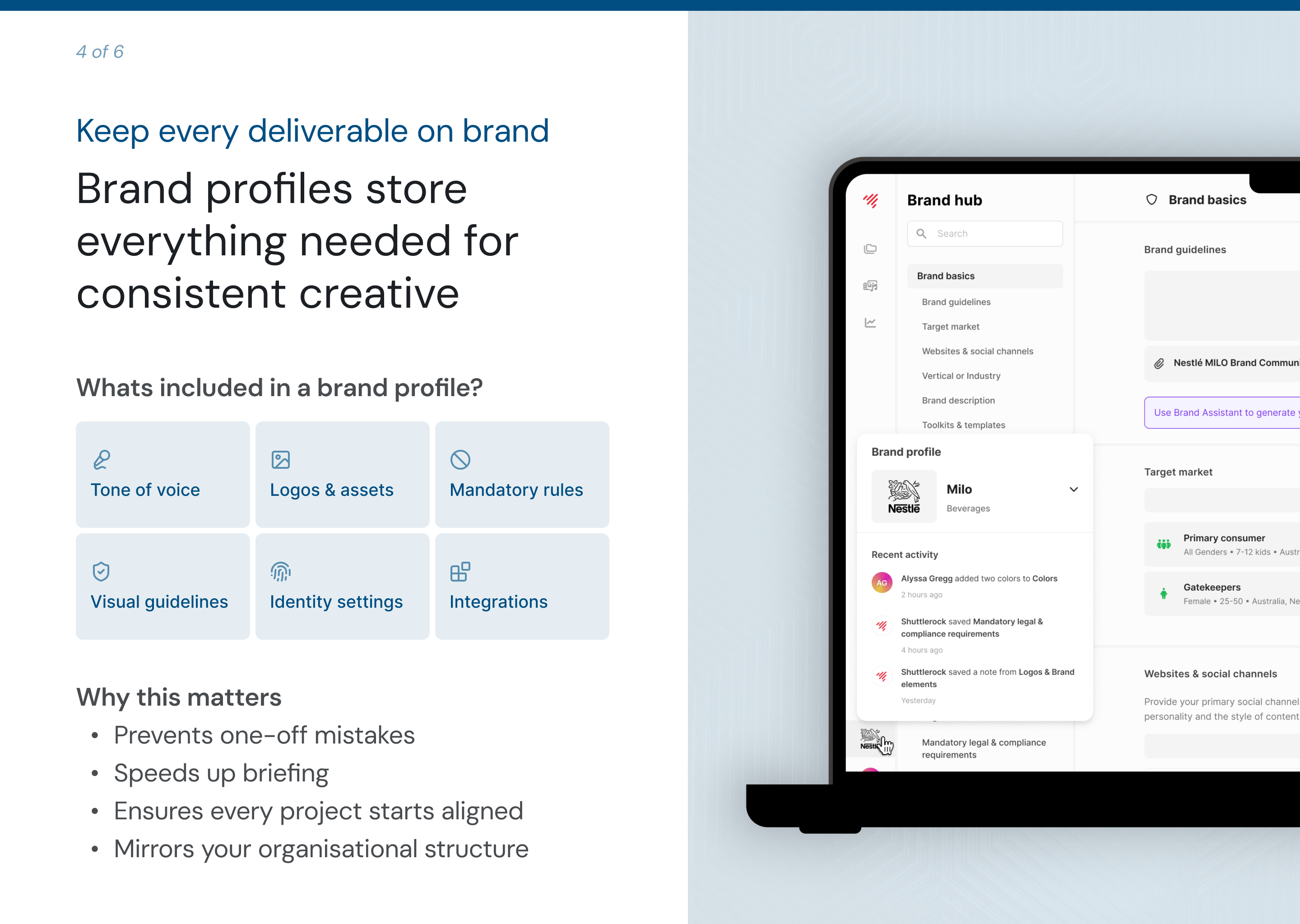
Shows how brand profiles centralise guidelines and assets - presented with icons and grouping to support rapid scanning and schema building.
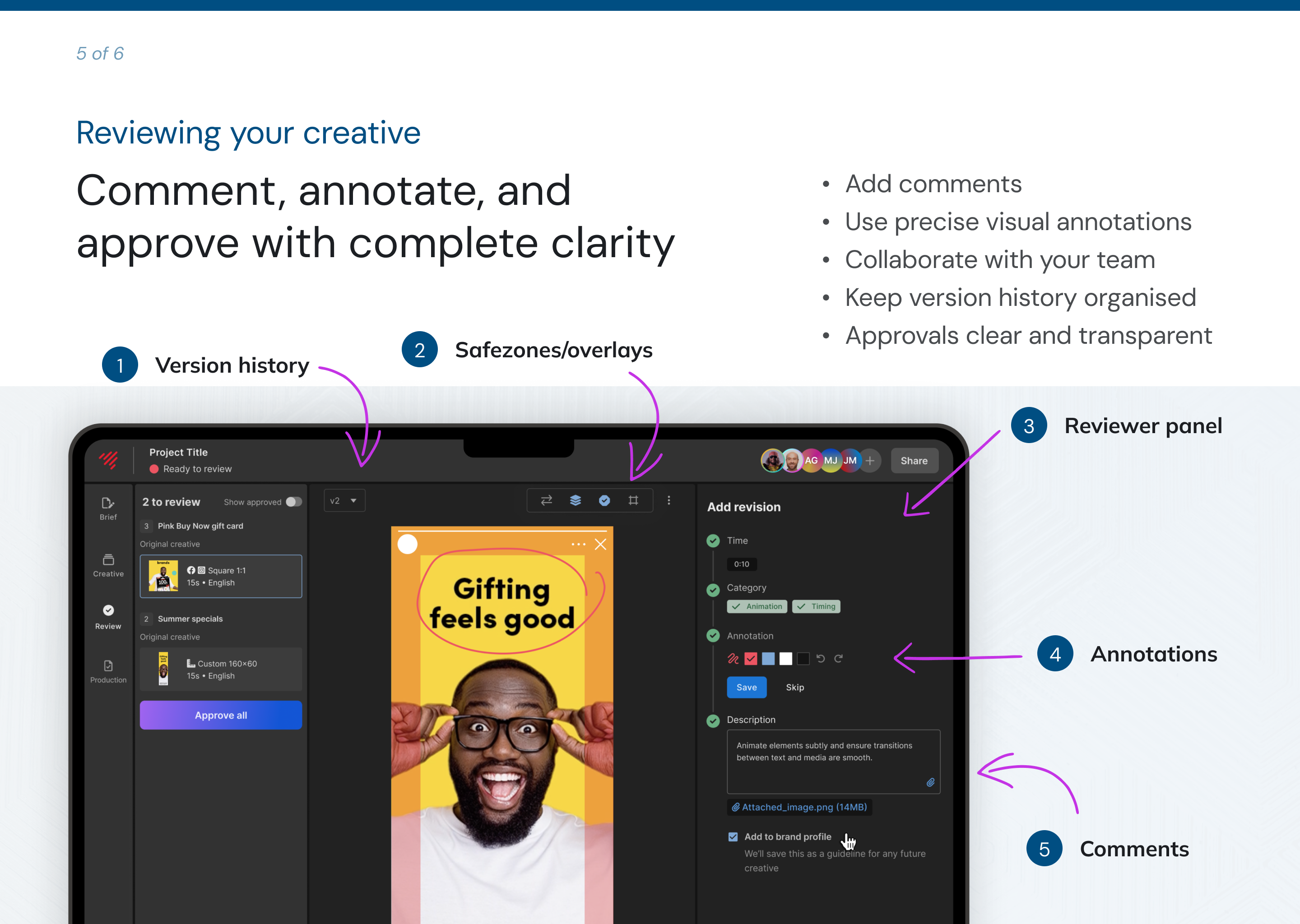
Introduces review tools using an applied example - designed to reinforce the “three-step” review method through labelled hotspots and visual cues.

Results & reflection

Compared to the original content, this redesigned module:

  • builds a clear mental model of the platform
  • reduces early friction
  • improves confidence for first-time users
  • provides a structured, easy-to-follow experience
  • helps customers understand “what to do next” faster

This project strengthened my approach to:

  • applying adult learning principles
  • sequencing information for clarity
  • using visuals to reduce cognitive load
  • designing for quick comprehension
  • keeping learning task-centred rather than feature-centred

Next steps

This foundation can grow into a broader customer onboarding pathway, including deeper dives into briefing, approvals, and creative best-practice guidance.

Kat McGowan

Home

/

ShuttlerockCloud customer basics

ShuttlerockCloud customer basics

Overview

A 5-minute microlearning module that gives new ShuttlerockCloud customers a clear, fast introduction to the platform’s essentials - AI controls, briefs, variations, brand profiles, and the creative workflow.

Built using adult learning principles to reduce cognitive load and help customers build a quick, accurate mental model of how to get started.

View the module

The challenge

New customers want to get started quickly and don’t have time for long-form training.

The original onboarding relied on isolated quiz questions and dense text, which made it difficult for learners to:

  • understand how the platform worked end-to-end
  • connect concepts such as AI controls, briefs, and variations
  • know which parts were optional vs required
  • build confidence before submitting their first project

This caused early friction and slowed time-to-value.

Learners needed:

  • a simple, high-level overview of the workflow
  • clarity on AI usage and privacy
  • visual guidance on scaling creative
  • a quick sense of “what to do first”

My approach

I approached this module using adult learning principles - sequencing content, reducing cognitive load, and presenting only the essential actions new customers need for their first project.

1. Defined the key messages

Prioritised the concepts customers need immediately:

AI controls, submitting briefs, understanding the workflow, scaling creative, and navigating review + approval.

This aligns with adult learning theory (Knowles): learners value content that is relevant, actionable, and tied to real tasks they need to perform right now.

2. Understood the learner

Customer onboarding is a moment where clarity and speed matter most.

I kept the experience lightweight and visual, focusing only on essential information that supports a quick, accurate mental model.

This is rooted in cognitive load theory - removing extraneous detail and keeping visuals simple supports comprehension and recall.

3. Designed a simple learning flow

The module follows a task-first sequence:

Welcome → AI → Workflow → Variations → Brand Profiles → Review → Quick Quiz → Next Steps

Each section delivers one concept at a time, supporting scaffolding (building knowledge progressively).

4. Built for clarity

I storyboarded the flow in Figma, then rebuilt it in Rise using:

  • custom full-width visuals
  • short instructional copy
  • simple workflow diagrams
  • callouts to highlight key decisions
  • scenario questions for reinforcement

Visuals and copy were designed to reduce cognitive load and let the content lead.

5. Tested & refined

Reviewed pacing and comprehension with peers, adjusted microcopy, simplified diagrams, and refined scenario questions to strengthen decision-making practice.

This aligns with iterative design principles and helps ensure real-world applicability.

Explains AI transparency and user control using clean visuals and short, high-value text - applying adult learning principles to keep information relevant and actionable.

The solution

The final module delivers a fast, guided introduction to ShuttlerockCloud:

  • explaining AI transparency and choice
  • clarifying how briefs flow into production
  • illustrating the end-to-end workflow
  • showing how to scale creative with variations
  • reinforcing brand consistency
  • demonstrating review and annotation tools

The tone is friendly and practical, giving learners just enough to feel confident - without overwhelming them.

Shows how brand profiles centralise guidelines and assets - presented with icons and grouping to support rapid scanning and schema building.

Introduces review tools using an applied example - designed to reinforce the “three-step” review method through labelled hotspots and visual cues.

Results & reflection

Compared to the original content, this redesigned module:

  • builds a clear mental model of the platform
  • reduces early friction
  • improves confidence for first-time users
  • provides a structured, easy-to-follow experience
  • helps customers understand “what to do next” faster

This project strengthened my approach to:

  • applying adult learning principles
  • sequencing information for clarity
  • using visuals to reduce cognitive load
  • designing for quick comprehension
  • keeping learning task-centred rather than feature-centred

Next steps

This foundation can grow into a broader customer onboarding pathway, including deeper dives into briefing, approvals, and creative best-practice guidance.

Kat McGowan

Home

/

ShuttlerockCloud customer basics

ShuttlerockCloud customer basics

Overview

A 5-minute microlearning module that gives new ShuttlerockCloud customers a clear, fast introduction to the platform’s essentials - AI controls, briefs, variations, brand profiles, and the creative workflow.

Built using adult learning principles to reduce cognitive load and help customers build a quick, accurate mental model of how to get started.

View the module

The challenge

New customers want to get started quickly and don’t have time for long-form training.

The original onboarding relied on isolated quiz questions and dense text, which made it difficult for learners to:

  • understand how the platform worked end-to-end
  • connect concepts such as AI controls, briefs, and variations
  • know which parts were optional vs required
  • build confidence before submitting their first project

This caused early friction and slowed time-to-value.

Learners needed:

  • a simple, high-level overview of the workflow
  • clarity on AI usage and privacy
  • visual guidance on scaling creative
  • a quick sense of “what to do first”

My approach

I approached this module using adult learning principles - sequencing content, reducing cognitive load, and presenting only the essential actions new customers need for their first project.

1. Defined the key messages

Prioritised the concepts customers need immediately:

AI controls, submitting briefs, understanding the workflow, scaling creative, and navigating review + approval.

This aligns with adult learning theory (Knowles): learners value content that is relevant, actionable, and tied to real tasks they need to perform right now.

2. Understood the learner

Customer onboarding is a moment where clarity and speed matter most.

I kept the experience lightweight and visual, focusing only on essential information that supports a quick, accurate mental model.

This is rooted in cognitive load theory - removing extraneous detail and keeping visuals simple supports comprehension and recall.

3. Designed a simple learning flow

The module follows a task-first sequence:

Welcome → AI → Workflow → Variations → Brand Profiles → Review → Quick Quiz → Next Steps

Each section delivers one concept at a time, supporting scaffolding (building knowledge progressively).

4. Built for clarity

I storyboarded the flow in Figma, then rebuilt it in Rise using:

  • custom full-width visuals
  • short instructional copy
  • simple workflow diagrams
  • callouts to highlight key decisions
  • scenario questions for reinforcement

Visuals and copy were designed to reduce cognitive load and let the content lead.

5. Tested & refined

Reviewed pacing and comprehension with peers, adjusted microcopy, simplified diagrams, and refined scenario questions to strengthen decision-making practice.

This aligns with iterative design principles and helps ensure real-world applicability.

Explains AI transparency and user control using clean visuals and short, high-value text - applying adult learning principles to keep information relevant and actionable.

The solution

The final module delivers a fast, guided introduction to ShuttlerockCloud:

  • explaining AI transparency and choice
  • clarifying how briefs flow into production
  • illustrating the end-to-end workflow
  • showing how to scale creative with variations
  • reinforcing brand consistency
  • demonstrating review and annotation tools

The tone is friendly and practical, giving learners just enough to feel confident - without overwhelming them.

Shows how brand profiles centralise guidelines and assets - presented with icons and grouping to support rapid scanning and schema building.

Introduces review tools using an applied example - designed to reinforce the “three-step” review method through labelled hotspots and visual cues.

Results & reflection

Compared to the original content, this redesigned module:

  • builds a clear mental model of the platform
  • reduces early friction
  • improves confidence for first-time users
  • provides a structured, easy-to-follow experience
  • helps customers understand “what to do next” faster

This project strengthened my approach to:

  • applying adult learning principles
  • sequencing information for clarity
  • using visuals to reduce cognitive load
  • designing for quick comprehension
  • keeping learning task-centred rather than feature-centred

Next steps

This foundation can grow into a broader customer onboarding pathway, including deeper dives into briefing, approvals, and creative best-practice guidance.